

Zero Space
Pin apps around you in 3DoF or 6DoF. Windows stay where you leave them, and a room-locked cursor follows your ring.
Zer0 OS replaces the stock software on the INMO Air3 with a system built for wearing all day: a room-locked desktop, a voice assistant you can talk to, and a phone that does the heavy lifting.
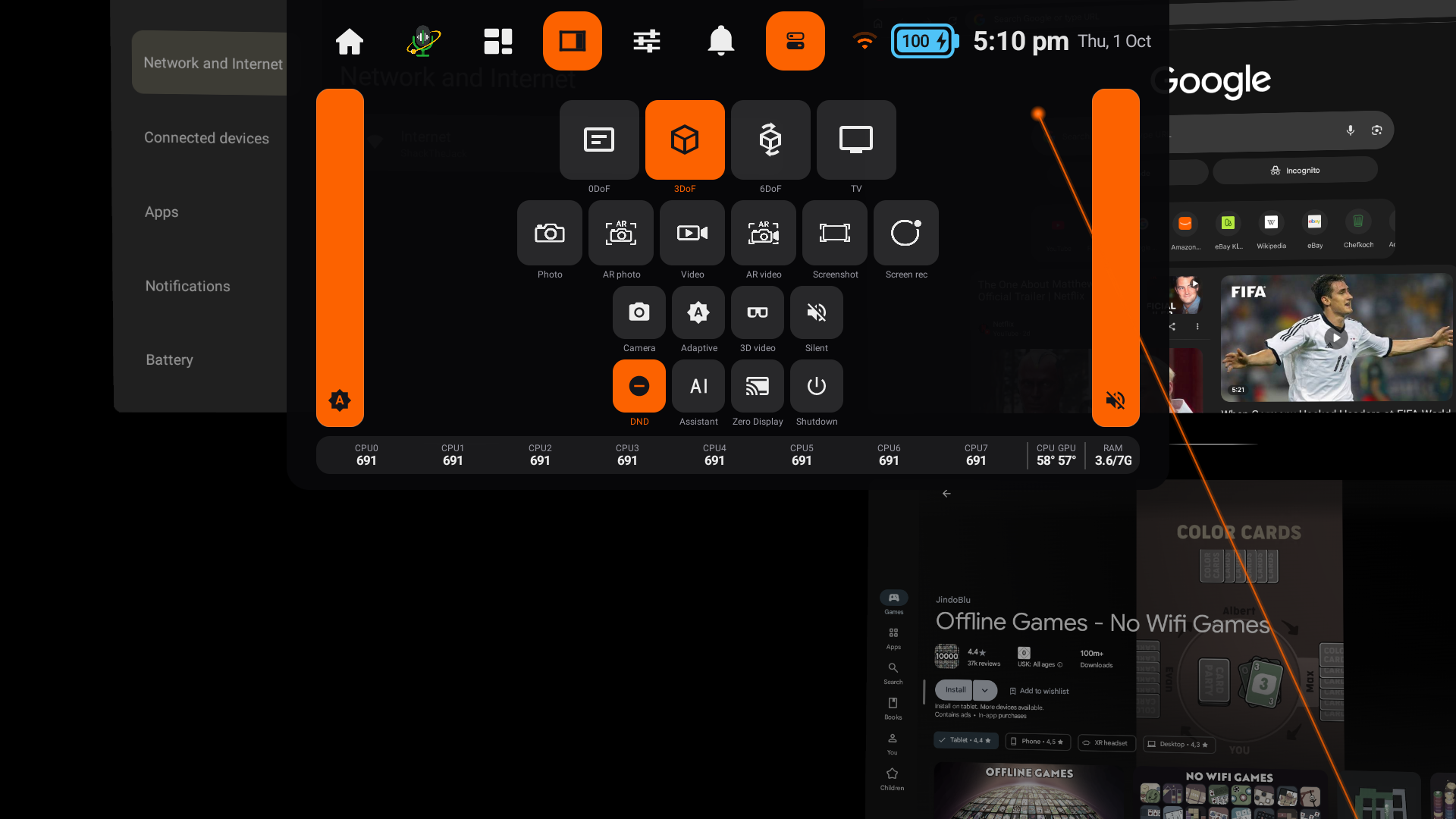
Pin apps around you in 3DoF or 6DoF. Windows stay where you leave them, and a room-locked cursor follows your ring.
Say "Orbit" and ask. The wake word runs on the glasses, and transcription and translation run on your phone.
The phone companion: remote shutter, brightness, volume, typing from your phone keyboard, and model downloads.
Mirror your glasses to your phone or PC, or cast a screen into your glasses.
A full TV home with a D-pad on the right temple, for when you want a big screen anywhere.
Display, sensor and CPU placement were measured and rebuilt, so video and spaces no longer cook the frame.
Zero Pilot is the free Android app for your glasses. Install it on your phone and pair once; these features depend on it:
Android app · Coming soon to Google Play
We'll read the serial number from your glasses so updates reach the right device.